
Scams are on the rise. Part of the problem is the increased dependence on technology and the improvements in technology (e.g., AI and automation) that allow better impersonation and automation. One report claims that more than $16 billion was lost to online scams in 2024. If scammers made $16 billion in 2024, you should expect things to just keep getting worse.
Scams are a lot like telemarketers. Any business or person that initiates contact with you first is doing it for their benefit, not yours.
The Unexpected
These are the most blatant things to keep in mind to avoid computer scams:
- Anything that is unexpected and very annoying (e.g., dinging and flashing warnings at short intervals) is probably a scam. (Children are expected to be annoying, so they are usually not a scam. Usually.)
- Anything that is unexpected and fear inducing (e.g., your computer is unprotected, you owe money, or your ordered something) is probably a scam. (If you ran your virus scanner, it might legitimately claim there was a virus.)
- Anything that is unexpected from an email address that does not make sense. (e.g., An email from “Microsoft” that was sent by sdfs789f6@gmail.com)
If any of those happen along with requesting or demanding:
- that you to pay money
- confirm an order
- cancel an order
- any personal information
- you click on a link
- permissions to be allowed
- to install software or plug-ins
These are nearly 100% guaranteed to be a scam. Real software and shopping sites do not do these things because people will stop buying and buy something that does not act stupid. (To be fair, the actual McAfee product is almost this bad, which is why many people uninstall it.)
And if it requests payment in crypto-currency or gift cards, it is pretty much always a scam.
The Expected
If you initiate the action, it becomes less clear, but you have to understand what “initiate contact” means. Just like telemarketers, online scams will try to trick you into feeling like you initiated contact because that makes you feel more confident that it is legitimate. Telemarketers leave a message with scam call back phone number, so when you call back, you feel like you initiated contact. This is why you are always supposed to look up the phone number on your utility bill or the official vendor website and not call the phone number left in the message.
Online scammers can do a similar thing with links. Take a look at the link below. What happens when you click on it? (Note: you will have to “open in new tab” or “go back” to get back to this page.)
What about this image with a link? What happens when you click on it?

This is one of the many ways that scammers get you to go where they want. The website that the link, image, or advertisement sends you to does not have to match the text or image. If you hover over the link on a PC, you will see where the link goes (on some browsers) in the lower left corner of the browser window. Phones and tablets provide this information, if you touch and hold the link. Unfortunately, links are not always obvious. Sometimes they have redirection or long informational blobs. You may not be able to easily tell if a link is valid.
Fear mongering and false links are a common scam technique for emails. This is why you are told to not click links or images in emails. These can take you to a website that looks identical to where you expect to be, but it is a scam website for stealing your money and personal information. Modern email can filter many of these out, but the occasional “Your McAfee subscription has been renewed for $355.99” or “Confirmed: You Amazon order for $513.35” emails still slip through. Fortunately, the spam catchers seemed to finally have caught all the ubiquitous Viagra emails.
To protect yourself from these types of scams, you should go to a website that you manually typed in or saved to your favorites from Google/Bing searches instead of using a link. Yes, it is pain in the rear, but it is essentially the same solution as the telemarketer scams.
The Examples
There are other less obvious indicators of scams, and they can sometimes be legitimate. Investigate these carefully. Here are some examples of obvious and less obvious scams (or potential scams).
Email Confirming Transaction
A common scam indicator in emails is improper spelling, grammar, formatting, and missing logos. If you have shopped online, you have a feel for what the purchase confirmation emails look like. When you see a badly formatted and all text email claiming to be a confirmation or notice, there is a good chance it is a scam. They usually come from an address that makes no sense. Do not bother to contact the sender. Usually, these go straight to your spam folder.
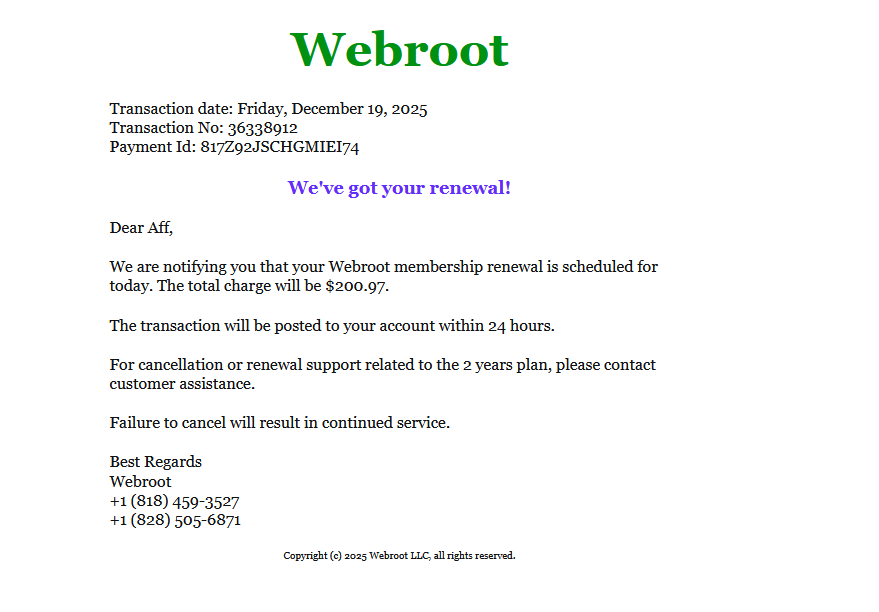
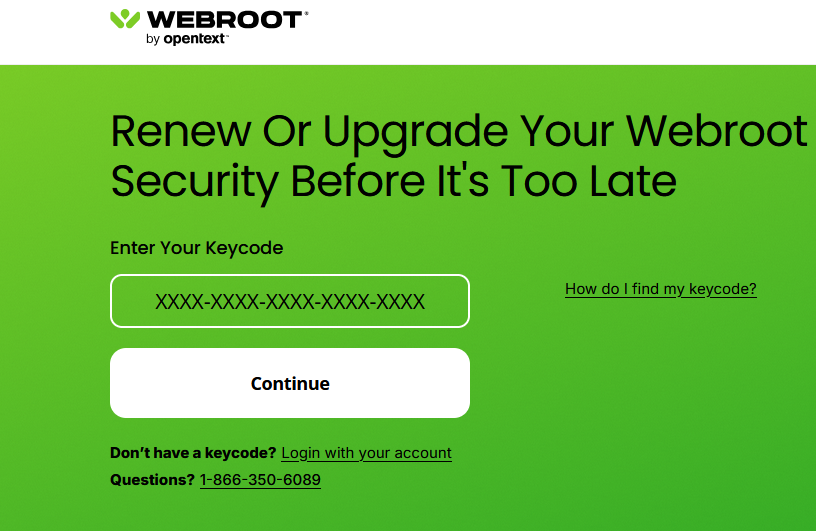
This is a well formatted, but blandly branded email from “Webroot”. You can see that the phone numbers do not match the website phone number.
Here is an even less formatted and unbranded email from “Microsoft”.
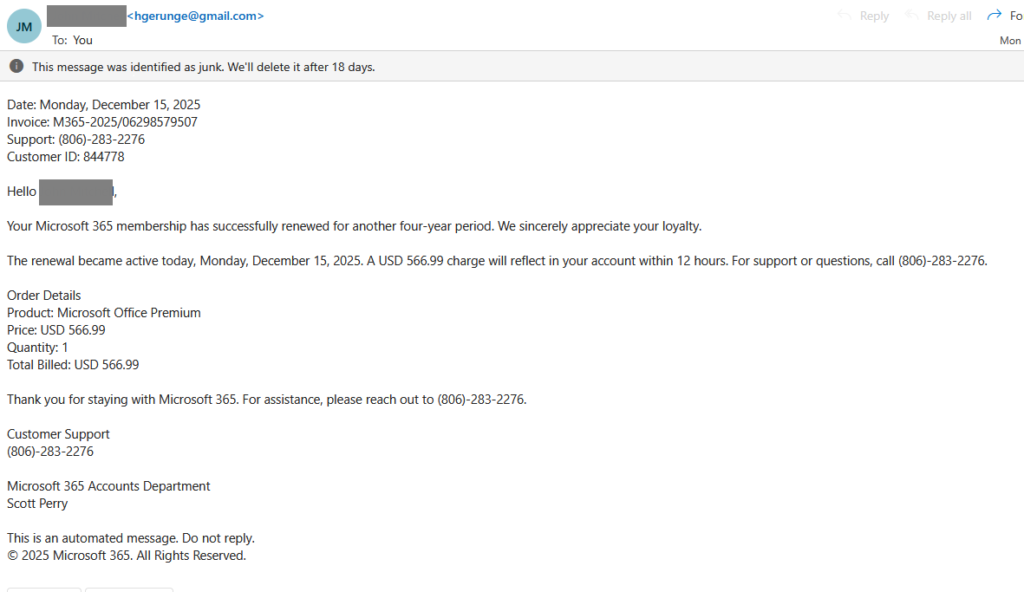
You can also see at the top that it came from a Google gmail.com address instead of a microsoft.com address.
Advertisements
Wut? Yeah, sadly, the advertisements on a non-trivial number of websites are scams. How can this be? It “can be” because companies are motivated by profit and not your safety and security. This is why John installed an ad-blocker in his browser and, largely, does not click on ads. One posting indicated that social media sites (i.e., Instagram, TikTok, etc.) are flooded with scam Ads. We have not done enough research to verify this ourselves.
Scam Ads can be fear mongering, appeal to greed, or just impersonate legitimate sites. Rather than click on the Ad,
- use your favorites to go to the official site you already bookmarked
- manually type in the URL in the location bar
- Google the company, but do not select the “sponsored” link
These Ads were at the top of John’s Outlook Email inbox today. That McAfee Ad looks really suspect.

Why would a McAfee Ad be “Your Payment Has Failed?” instead of “World’s Most Installed Security Software!”? It would not be surprising to find that the Ad links to a “McAfee” scam website that “checks” your subscription payment, lets you know it “failed”, and offers to let you “renew” right then and there. So “helpful”!
Anything Full Screen
Some of you probably use your browser full screen, so this might be hard to notice. Most websites do not have full screen content in the sense that a single image takes up the full screen. The shopping sites have images along with prices and item details. The news sites have images interleaved with news. Anything that makes your browser go full screen or takes up the full screen is a bit suspect. If you add fear mongering, it is almost always a scam.
This image looks like a McAfee Virus Scanning popup warning you that viruses were found, but if you look closely, you will notice a few things.
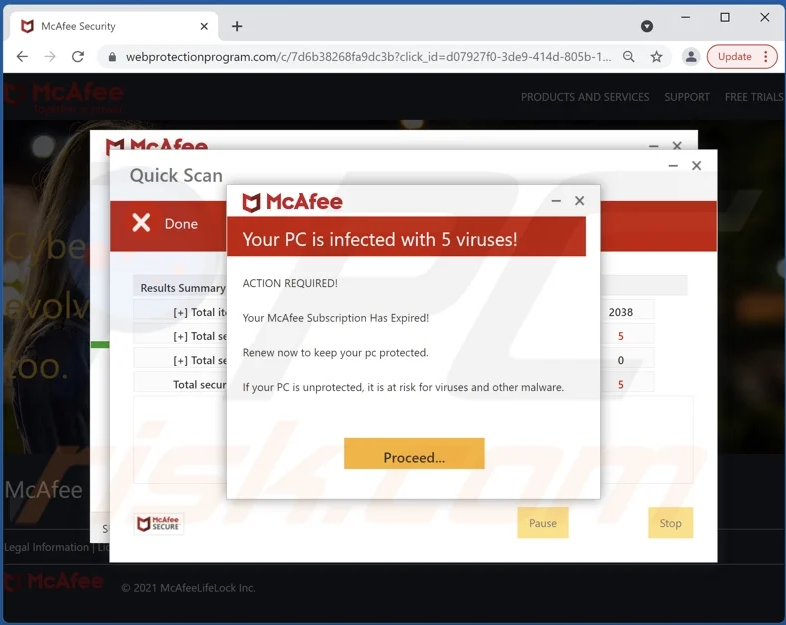
First, you can the the header bar of the browser at the top. Second, the web site is a suspicious vague security name.
This is a web page that is a full screen fake McAfee warning that is trying to get you to click on it to get you to pay, steal personal information, or get you to install malware on your computer. If you see something like this while using the internet browser,
- DO NOT CLICK ON THE BUTTONS
- DO NOT PROVIDE PERSONAL INFORMATION
- DO NOT ALLOW ANY PERMISSIONS
- DO NOT INSTALL ANY PLUG-INS OR APPLICATIONS
The first thing to do is to minimize the browser window. If the full screen “warning” goes away, maximize the browser again. It the warning appears and disappears when you minimize and maximize, it was fake. (Note: the notification center warnings in the lower right tend to time out and be hidden automatically, after a few seconds.)
Anything Requesting Permissions
More and more, websites and applications are requesting permission to access services on your computer, tablet, and phone. In general, you want to block these, if the website or application will still work.
For example, brick and mortar stores want to use your location services to tell you where the nearest store is. It is safer to block access to location services and just type in a zip code. (At least you know your own zipcode; we have to lookup the zipcode of our current camp site.)
As another example, there are cases where you HAVE to provide access to a service for the website or application to be useful, such as using google maps for driving. It is hard to get directions from an application that has no idea where you are.
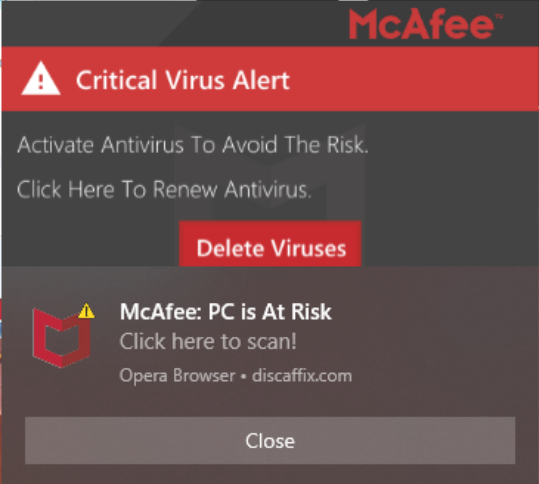
Make sure that you know that the application or website you are giving permission to is legitimate. There is malicious website/organization referred to as Skooe.co.in that uses a legitimate functionality to fear monger to profit. The Ad or website presents itself as a legitimate website, and it asks you to allow notifications. When you allow notifications, it spams you with fake warnings claiming you have viruses, your virus scanner subscription is expiring, etc. It may also include dinging and be fast or slow barrage of notifications. If you click on a notification, it may send you to a site similar to the full screen virus scanner warning above. The fake notifications look somewhat legitimate, but you might notice that the notification is associated with some random website instead of the virus scanner company.
This is the type of popup that will appear in the lower right of the screen. You might notice that is shows a hodge-podge of different warnings, products, and vendors. This is a clear sign that it is not legitimate. You would not expect McAfee, Norton, Webroot, and WebAdviser all to be installed and running.
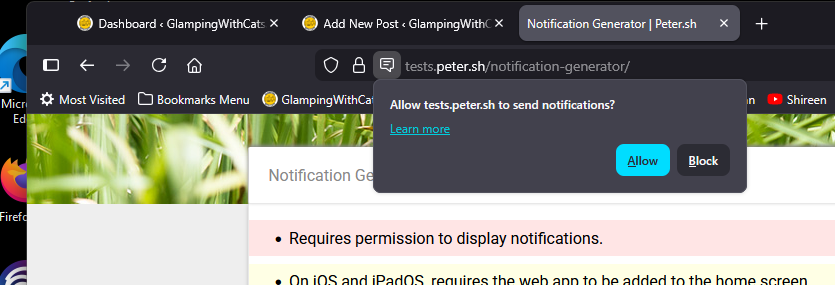
The request for permission looks something like the image below on a Firefox browser. Edge and Chrome will have something similar, but it probably will not be identical. Unless you know what you are doing, you should select block.
Too Good to be True
Anything that is “too good to be true” (e.g., you have never seen a price that low or only one unknown vendor has it in stock) is probably a scam. Even if you are shopping at Amazon or Wal-mart, not all of their marketplace vendors are legitimate. You can perform a Google search to see if the company is legitimate.
Every time a new and significantly better digital camera model comes out from Canon or Nikon, someone gets scammed trying to buy one that is 50% off the retail price. These people then post warnings complaining about getting scammed, but the deal was too good to pass up. Greed will get you eventually. It might not be every time, but eventually, it will get you.
Online shopping scams are everywhere. Your best bet is to stay with the major stores, such as Wal-mart, Target, Best-Buy, and Amazon. It can be hard to tell, but you are safest staying with the actual store instead of the marketplace. We do not like eBay, but it is pretty protective of buyers.
If you find a huge deal, you might want to do a google search for the company AND the website. Some of the scams use names and websites that are very similar to real names and websites. You will want to copy the suspect name and website from the browser to make sure you do not type in the legitimate name and website for checks.
Merry Scammed-mas
We realize that a lot of this is going to sound like Greek (or maybe Russian, if you speak Greek). Read it, think about it, and read it again. No one wants to get scammed for the holidays.